To change the balance of a client's loyalty scheme
Go to: Main menu > Clients module > Clients menu > Client Details > select client.
From the Client Details window, click the More Commands menu and select Change Loyalty Balances. Please Note: If you are using the password system you will only be able to access this option if your username has access.
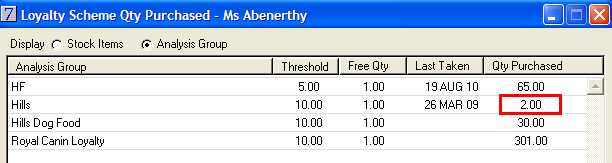
Select to change either Stock Items or Analysis Group balances.
In the Qty Purchased field for the stock item for which you wish to enter an opening balance, type the quantity of stock that the client has previously purchased.
For example, if the stock loyalty threshold is 10 and the client has previously purchased 8, the Qty Purchased is 2.
Click Update and click Yes to the following prompt:
The client's loyalty scheme balance will be updated.